 Mappi
Free
To get started
€0
Forever
€0
Forever
- Routes up to 10 stops
- Route optimization
- Turn-by-turn navigation
- Search, dictation and scanning with basic daily limits
App for couriers and drivers
Mappi puts your stops in the most efficient order, guides you turn by turn and lets you add addresses by voice or from a photo of your delivery list.
Features
From the first address to the last delivery, no paper sheets, no juggling apps.
Add your stops and tap “Optimize”: Mappi reorders them starting from your position and taking traffic into account.
Voice guidance, next maneuver, arrival time and progress, even with the screen locked during an active route.
Take a photo of the delivery list: Mappi reads the addresses and proposes them as stops. You review everything before adding.
Say the address out loud while you load the van: no typing, fewer mistakes.
Set a time window, notes, package count and time at stop for each stop. Notes are searchable.
Mark each stop in one tap, with instant undo. Routes and settings sync with your account.
Your round
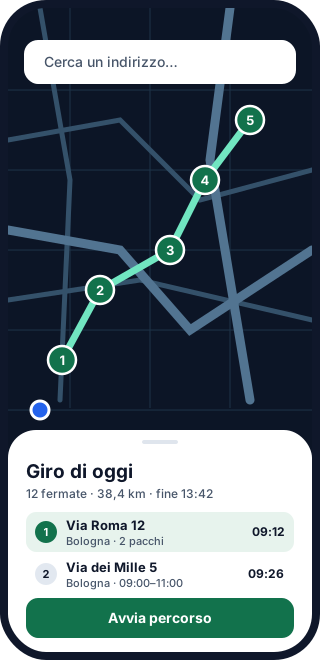
The map shows the route, the list shows what comes next: stop number, address, expected time and notes. Order never depends on the map alone.
On the road
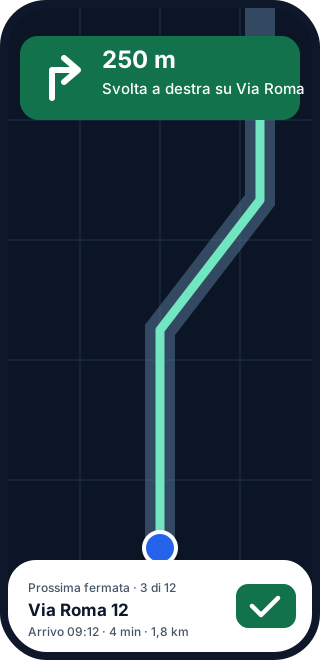
One instruction at a time: the next turn, the current stop and how far is left. When you deliver, mark the stop and Mappi moves on to the next one.
How it works
Search an address, dictate it, or photograph the delivery list.
In one tap Mappi works out the best order starting from where you are.
Follow the navigation and mark each stop as delivered or not delivered.
Pricing
The Free plan is enough for small rounds. Lite and Standard have unlimited stops. Try them free for 7 days, cancel anytime.
To get started
Forever
Forever
For everyday delivery
Billed monthly
€29.94 per year · save 50%
For very busy rounds
Billed monthly
€59.94 per year · save 50%
Prices in euro, may vary by country and taxes. Subscriptions are purchased in the App Store or on Google Play, renew automatically and can be cancelled at any time from your store settings. See the terms of use for details.
With the Free plan you can plan and navigate routes up to 10 stops. Longer routes need Lite or Standard, which have no stop limit.
Lite and Standard include a 7-day free trial. If you do not cancel before the trial ends, the subscription starts and renews automatically. You can cancel at any time from your App Store or Google Play account settings: see the steps on the Support page.
Only while you have an active route, to keep guiding you with the screen locked and announce turns. When the route ends, Mappi stops using it. We explain it in detail in the privacy policy.
You take a photo of the delivery list, Mappi reads the addresses and shows them for review. Only the stops you confirm are added to the route.
No. Mappi has no advertising and does not sell personal data.
Mappi is coming to iPhone (App Store) and Android (Google Play). The app is not published yet: the download buttons are marked “Coming soon”.
They are an aid, not a guarantee. Traffic, closures, restricted traffic zones and access restrictions may not be taken into account: always follow road signs and traffic law. See the terms of use.
Mappi is coming soon to the App Store and Google Play.